
How to use the Number Blocks Generator: menu, jumps, Set and number facts
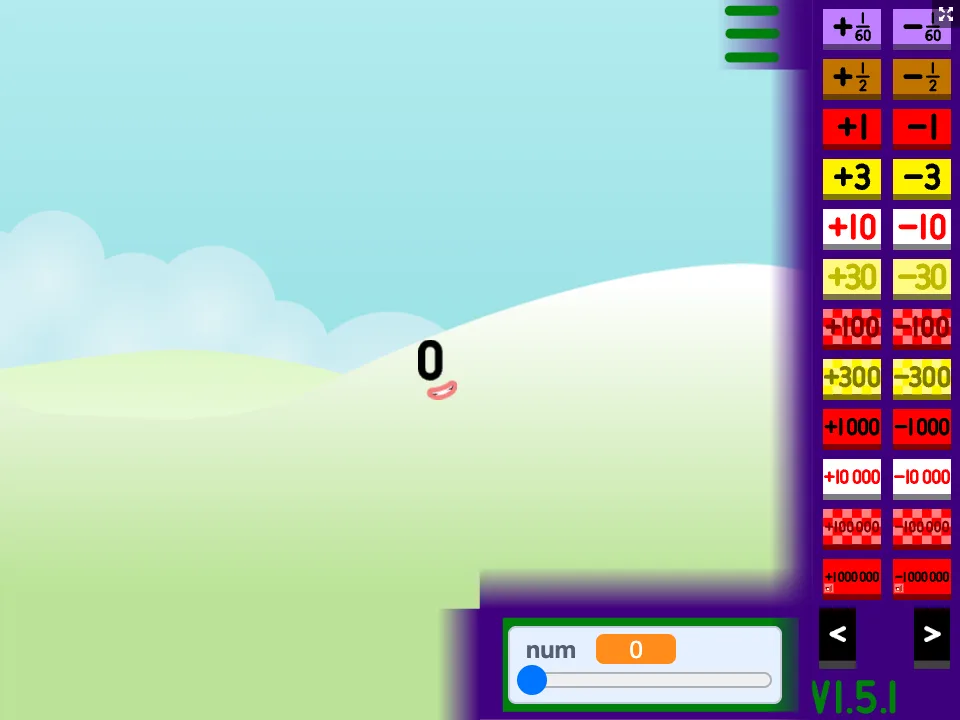
Play while you read: the generator is on the home page. Open the generator
Before you start
The generator is a large package, so the first load can take a while on a slow connection. Wait until the landscape and the current number appear before pressing anything; clicks during loading are ignored.
The game starts at 0. The number on screen is the one every button and panel works with.
The menu: jumping up and down
The three-bar button opens the menu. It holds pairs of buttons that add or subtract a fixed amount, from fractions such as 1/2 up to very large jumps, spread over several pages that you move through with the previous and next arrows.
- Use +1 and -1 when you want to watch how each step changes the character, for example from 9 to 10 where a new column appears.
- Use +10 or +100 to see what stays the same: the ones digit does not change when you add ten.
- Use the bigger jumps to explore thousands and millions, then come back down with the matching minus buttons.
Set: go straight to a number
Set asks you to type a whole number, then asks how many sixtieths to add (type 0 if you only want the whole number). It is the quickest way to answer questions such as "What does 64 look like?" without pressing +1 sixty-four times.
Clubs: numbers that belong together
Clubs groups numbers by a shared property, such as even numbers, multiples of 5 or primes. Opening it for the current number is a good prompt for conversation: why is 36 in more clubs than 37?
Clubs checks can be slow for very large numbers. If the panel takes a moment to fill, wait before clicking again.
Number facts and Break it down
The version on NumBlocksGen adds two things that are not in the original Scratch project. The Number facts button in the top-left corner opens a panel with the place value, odd or even, and prime or composite status of the number on screen, updated as you play.
The Break it down button at the bottom of the stage opens the Number Blocks Tool in a new tab with the current number filled in. There you get the full factor list, block and rectangle pictures, and a printable practice card with answers.
Three short activities
Each takes five to ten minutes and works for one child or a small group.
- Ten-crossing: start at 7 and press +1 until you reach 13. At each step, say how many tens and ones there are. Check with Number facts.
- Prime hunt: use Set to try 21, 23, 25 and 27. Guess which is prime before opening Number facts (only 23 is).
- Big-number tour: jump to 1,000, then 10,000, then 100,000. In the tool, compare the place-value tables. Each time, one more zero appears and the 1 moves one place left.