
Number Blocks Generator
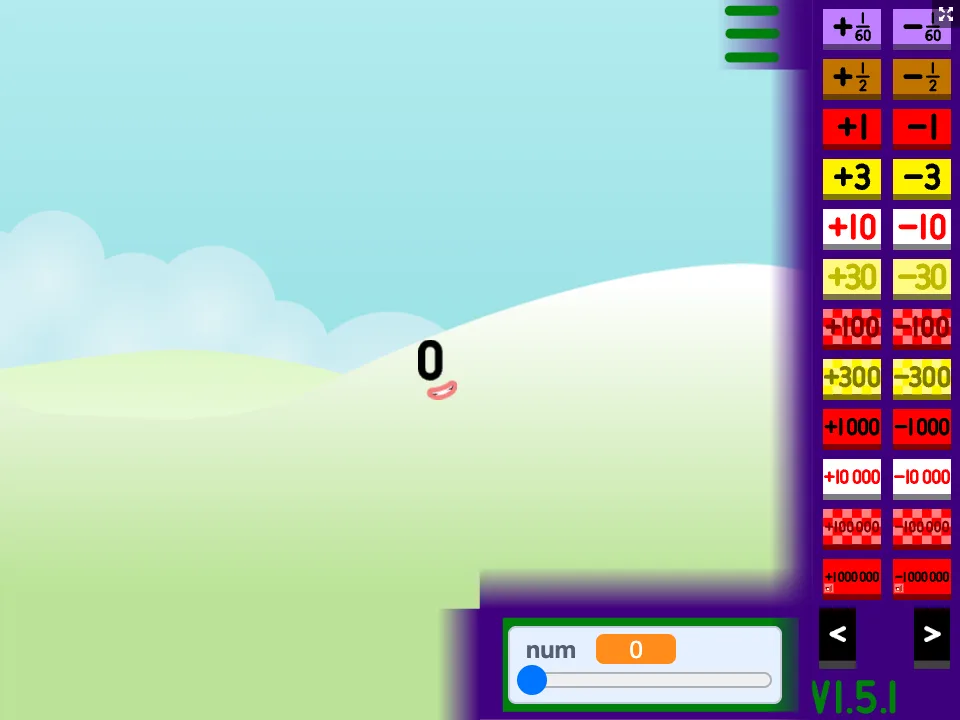
Press Play now and change the number on screen. The block character grows, shrinks and changes colour to match, from zero up into the billions. It is a quick way to see what a number looks like before you calculate with it.
Our version adds two learning features to the original Scratch project: a Number facts panel (top-left of the game) that shows the place value, odd or even, and prime status of the current number, and a Break it down button that opens the Number Blocks Tool with that number filled in.
How to play
- Press Play now and wait for the landscape and the number 0 to appear. The first load is large and can take a little while.
- Open the three-bar menu. Use the plus and minus buttons to jump by 1, 10, 100 and more; the arrows switch between pages of bigger jumps.
- Choose Set to type an exact number. When it asks for sixtieths, type 0.
- Open Clubs to see which groups the number belongs to.
- Press Number facts for a quick summary, or Break it down for the full breakdown and a printable card.
More detail, with three short activities: How to use the Number Blocks Generator: menu, jumps, Set and number facts.
What to look for while you play
Go from 9 to 10 or 99 to 100 one step at a time. What appears, and what disappears? The Number facts panel shows the digits shifting one place to the left.
Step through 1 to 10 and keep the facts panel open. Even numbers split into two equal groups; odd numbers always have one left over.
Try 4, 9, 16 and 25. In the tool each one can be laid out as a perfect square, which is where the name square number comes from.
Ideas for parents and teachers
Ask a prediction question before every jump: "What will it look like if we add ten?" Then check. Guessing first and checking afterwards gets a child thinking about the number instead of just pressing buttons. Older children can use Set to test their own ideas, for example "Is 51 prime?", then confirm with Number facts. (It is not: 51 = 3 × 17.)
After a session, print a practice card from the Number Blocks Tool for the last number you looked at. The answers are on the card, so the learner can mark it themselves.
Learn the ideas behind the blocks
All lessons · Printable worksheets · Number blocks vs base ten
Related number games
Frequently asked questions
Is this an official BBC game?
No. NumBlocksGen is an independent site and is not affiliated with the BBC, Alphablocks Ltd or Blue Zoo. The generator is a remix of a Scratch community project by brizluca, shared under CC BY-SA 2.0 and credited on this page.
What did NumBlocksGen change in the generator?
We added a Number facts panel that shows the place value, odd or even and prime status of the number on screen, a Break it down button that opens the Number Blocks Tool with that number, and clearer wording on the number prompt. The original characters and game logic are unchanged.
How do I go straight to a particular number?
Open the menu and choose Set, type the whole number, then type 0 when it asks for sixtieths. The block character and the number label update together.
Why does the first load take a while?
The game contains well over a thousand drawings for different numbers, so the package is large. Wait for the landscape and the number 0 to appear before pressing anything.
Can I print practice questions for the number on screen?
Yes. Press Break it down (or open Number facts and follow the link). The Number Blocks Tool opens with the same number and has a Print this card button that prints six questions and their answers.
The generator is a remix of a Scratch project by brizluca, which is shared under the Creative Commons Attribution-ShareAlike 2.0 licence. NumBlocks added the Number facts panel, the Break it down button and new prompt wording; our remix is shared under the same licence. The character drawings belong to the original project. NumBlocks is not affiliated with the BBC, Alphablocks Ltd or Blue Zoo. See credits.