
Tiles Logic Game
Step across every green tile once, use repeatable yellow tiles carefully, and solve each logic board.
Tested by NumBlocksGen
What we reproduced
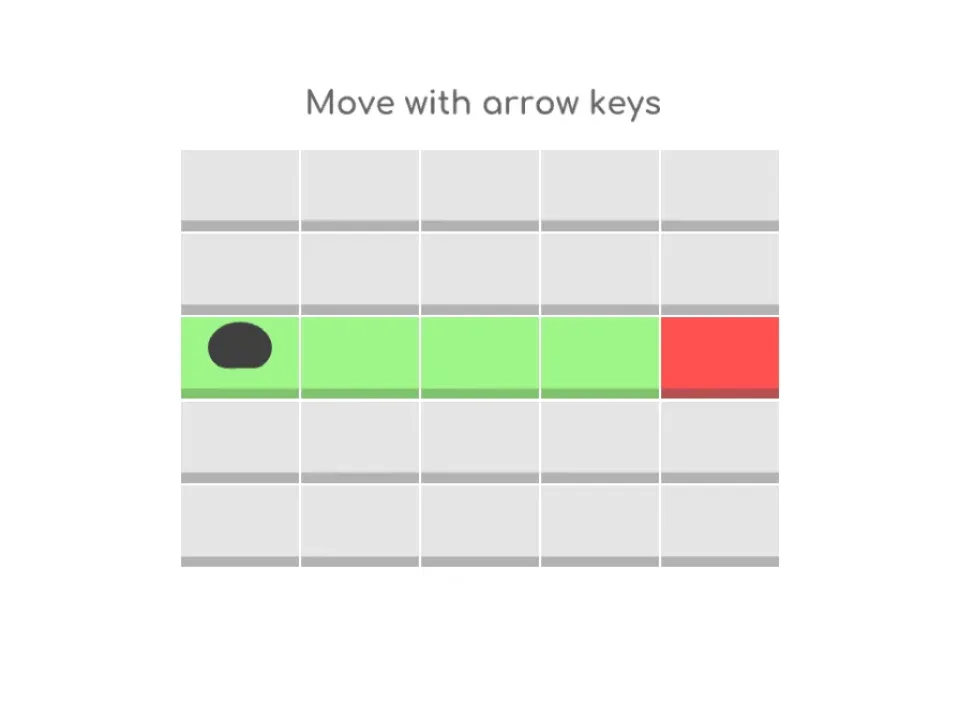
- Selecting Play opened an interactive tutorial board rather than another title screen.
- The tutorial placed a dark player piece on a green route with a red endpoint.
- The on-screen instruction explicitly identified the arrow keys as the movement input.
Known limitation: The verified control path is keyboard-based, so touch-only devices may not provide a complete play experience.
Scratch project by Rosyda. View the original Scratch project Packaged with TurboWarp Packager and credited to the original Scratch creator.
Original project title: Tiles Logic Game by Rosyda on Scratch. Permission reference NBG-RIGHTS-009 is recorded as owner confirmed and was reviewed 2026-07-17.
The source instructions describe a tile path puzzle: use arrow keys, step on every green tile to win, use yellow tiles multiple times, and replay if you lose.
Editor's Guide
Tiles Logic Game is a route-planning puzzle. The green tiles act like a checklist that disappears as you solve the path, while yellow tiles can be reused. That difference forces players to think about when to cross each space.
The original notes mention that some players find level 10 hard, which is a good clue about the game: later puzzles are less about movement skill and more about mapping a route before you commit.
- Path planning
- Logic players who like grid puzzles
- Short but thoughtful levels
The game teaches route optimization and memory. Players practice holding a path in mind, then adjusting when one tile choice blocks the rest.
- The space-skip option exists but is not ideal for learning
- Some levels need several attempts
- Touch players may prefer a larger screen
Why this game is worth playing
- The tile colors communicate the rules clearly without a long tutorial.
- Replay is built into the loop, so mistakes become part of learning the route.
- Harder levels reward planning all steps, not just reacting to the next tile.
How to play
- Click the green flag in the game frame.
- Move with the arrow keys.
- Step on every green tile to clear the board.
- Use yellow tiles when you need to cross the same space more than once.
Tips before you play
- Treat yellow tiles as bridges and save them for moments when you need to cross back.
- Scan the board for dead ends before moving from the start tile.
- If you lose, remember which green tile was left behind and plan around it next time.
Tiles Logic Game FAQ
What are the basic controls?
The Scratch instructions say to use the arrow keys to move.
How do green and yellow tiles work?
The source instructions say players step on all green tiles to win, while yellow tiles can be stepped on multiple times.
Should I skip a difficult level?
The source notes mention pressing space to skip, but also say it is not recommended.